Fiverr hourly orders and the weekly report
Track hours in Fiverr's UTC week, fix the warnings, and copy the text for Fiverr's Report hours form.
Fiverr hourly orders are reported week by week. Each week runs from Monday 00:00 to Sunday 23:59 UTC, whatever your own time zone. The order page in Invollo follows the same week, so your hours always match what Fiverr expects.
Tracking time on the order
Start the timer on the order's project, in the Time Tracker, the desktop tracker or the browser extension. The project picker marks it with a badge such as "Fiverr FO52A…". A session counts in the week it started. If you work past Sunday 23:59 UTC, Invollo warns you to split the session at midnight UTC so each week gets its own hours.
Reading the week
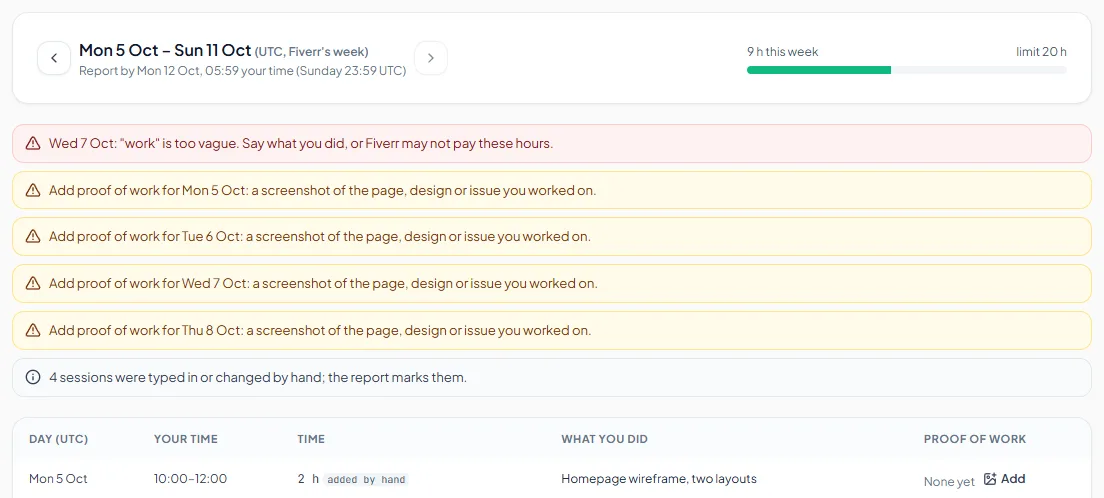
Open the order from the Marketplace page. At the top you see the week (with arrows to move between weeks), "Report by …" in your own time, the hours this week and the weekly limit bar. The bar turns amber above 85% of the limit and red above it.
Warnings to fix before you report
- Vague notes: Fiverr says vague entries such as "test", "work" or empty fields may disqualify your hours. Click the note and say what you did (for example "Built the pricing page header"). Reporting stays blocked until vague notes are fixed.
- Proof of work: for each day with hours, add a screenshot of the page, design or issue you worked on. Click Add in the Proof of work column (PNG, JPEG or WebP, up to 5 MB), or use Capture proof in the browser extension.
- Over the weekly limit: Fiverr doesn't pay hours above the limit.
- Over the estimate: agree more hours with the client before going far above it.
- A session past Sunday 23:59 UTC: split it in two at midnight UTC.
- Sessions typed in or changed by hand are marked in the report.
- Deadline: in the last 24 hours of the week, the page reminds you to report.
Reporting the week on Fiverr
- On Fiverr, open the order, then Activity, then Report hours.
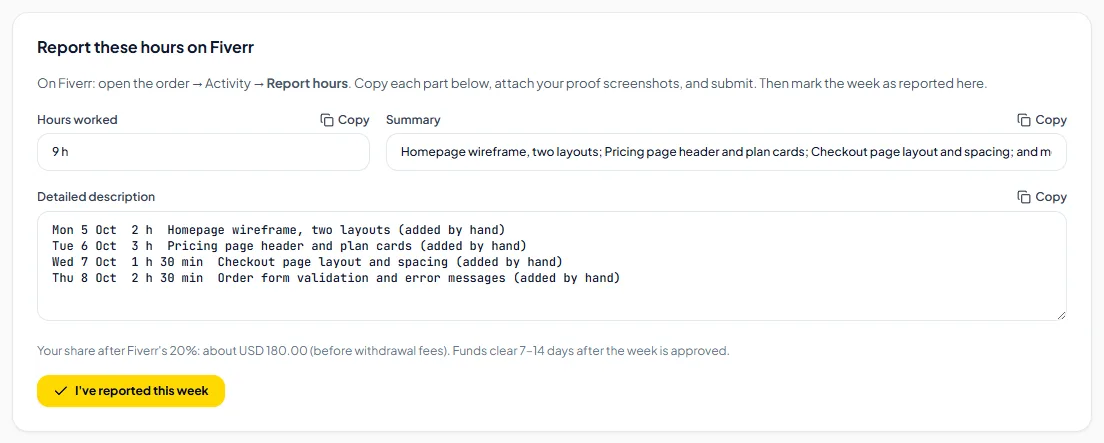
- In Invollo, copy each part from the "Report these hours on Fiverr" card with its Copy button: Hours worked, Summary and Detailed description.
- Paste each part into Fiverr's form, attach your proof screenshots, and submit on Fiverr.
- Back in Invollo, click I've reported this week.
After you report
A reported week shows as Reported with its report code. When Fiverr updates the week, mark it Approved, Disputed, Paid or Cancelled so your earnings stay correct. Past weeks are listed under Reported weeks.
Related Guides
Proof of work and proof packs
Add screenshots of your work to each day, and download a proof pack with fingerprints you can check.
Marketplace earnings, withdrawals and statement check
See what you earned after fees, when it clears, what you withdrew, and check it against your Fiverr statement.
Getting started with the Marketplace module
Keep your own records of Fiverr, Upwork and Freelancer.com orders: what the module is, how to turn it on, orders and projects, and plan limits.
Ready to streamline your invoicing?
Start on Invollo’s free plan with no credit card required. Manage invoices, time tracking, and client billing in one place.