Quotations & E-SignaturesUpdated October 5, 2026
Creating and sending proposals and quotations
Create quotations with line items, an expiry date, notes and terms, then send them to your client to accept online.
Invollo quotations let you present scope and pricing to clients, who can accept online with an e-signature designed to meet ESIGN/eIDAS requirements for simple electronic signatures.
How to build and send a quotation
- Go to Quotations in the sidebar and click New Quotation.
- Select the Client. The quotation uses the client's Preferred Currency.
- Set the Issue Date and the Expiry Date.
- Click Add Item to add line items for milestones, hourly estimates, or fixed deliverables, then choose the tax rate and any discount.
- Add Notes if needed (your client sees them on the quotation page) and Terms for your own copy.
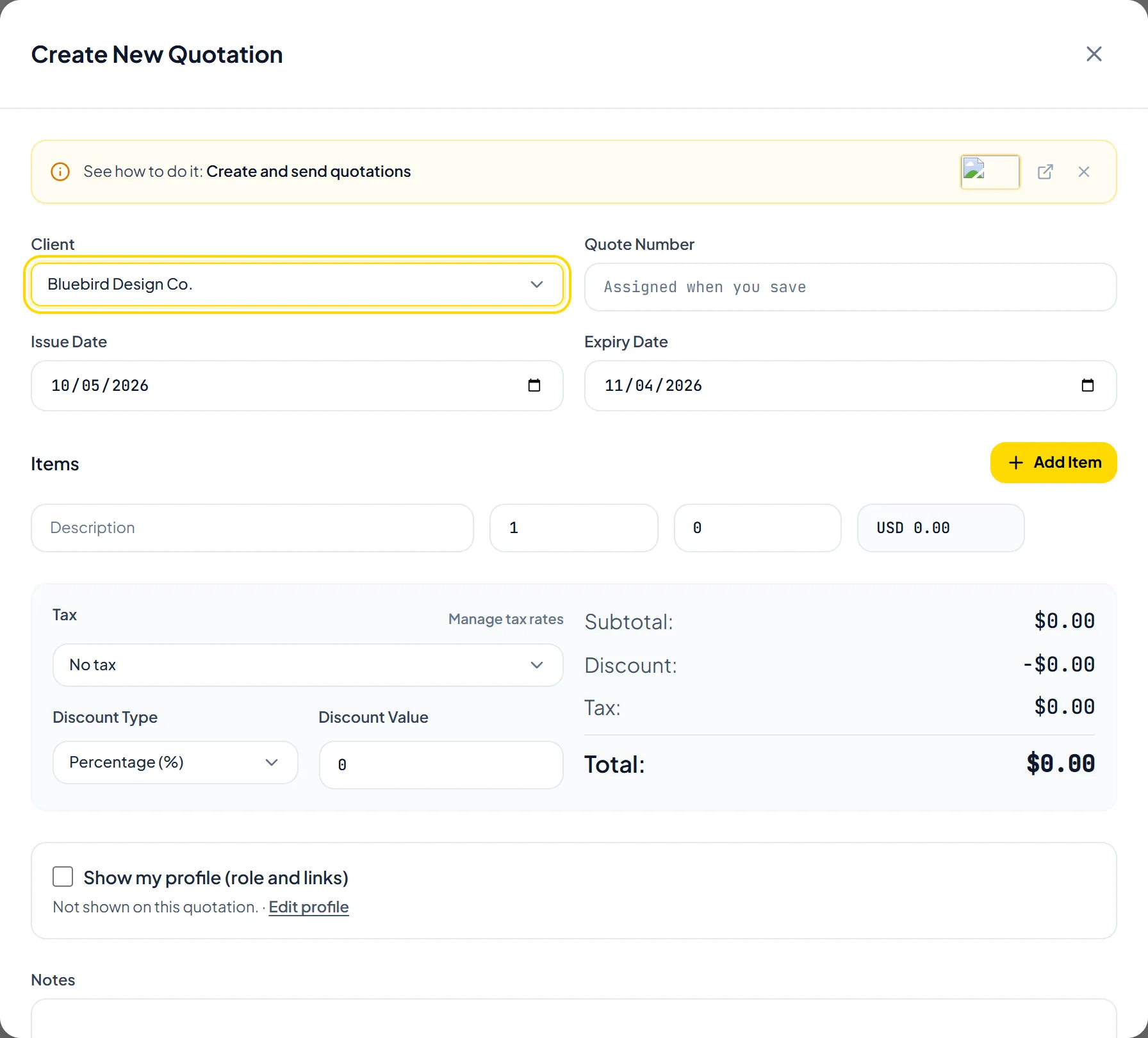
- Click Create Quotation, open the quotation and click Send to Client. The link for your client is created on the first send.
Helpful TipSetting a clear expiry date encourages timely decisions and protects your pricing against timeline creep.
Was this guide missing something or do you need further clarification?Contact Support
Related Guides
How clients accept and e-sign quotations
Learn how clients accept quotations online with a typed full name and a drawn signature.
Read guide
Converting an accepted quotation to an invoice
Turn an accepted quotation into a new invoice pre-filled with its client, line items, tax, discount, and notes.
Read guide
Creating and sending your first invoice
Step-by-step guide to choosing a client, adding line items, saving a draft, and emailing an invoice.
Read guide
Ready to streamline your invoicing?
Start on Invollo’s free plan with no credit card required. Manage invoices, time tracking, and client billing in one place.
Free forever plan · No credit card required · 0% of your client payments